
Maximise Fan Engagement with YouTube Premieres
What is a YouTube Premiere?
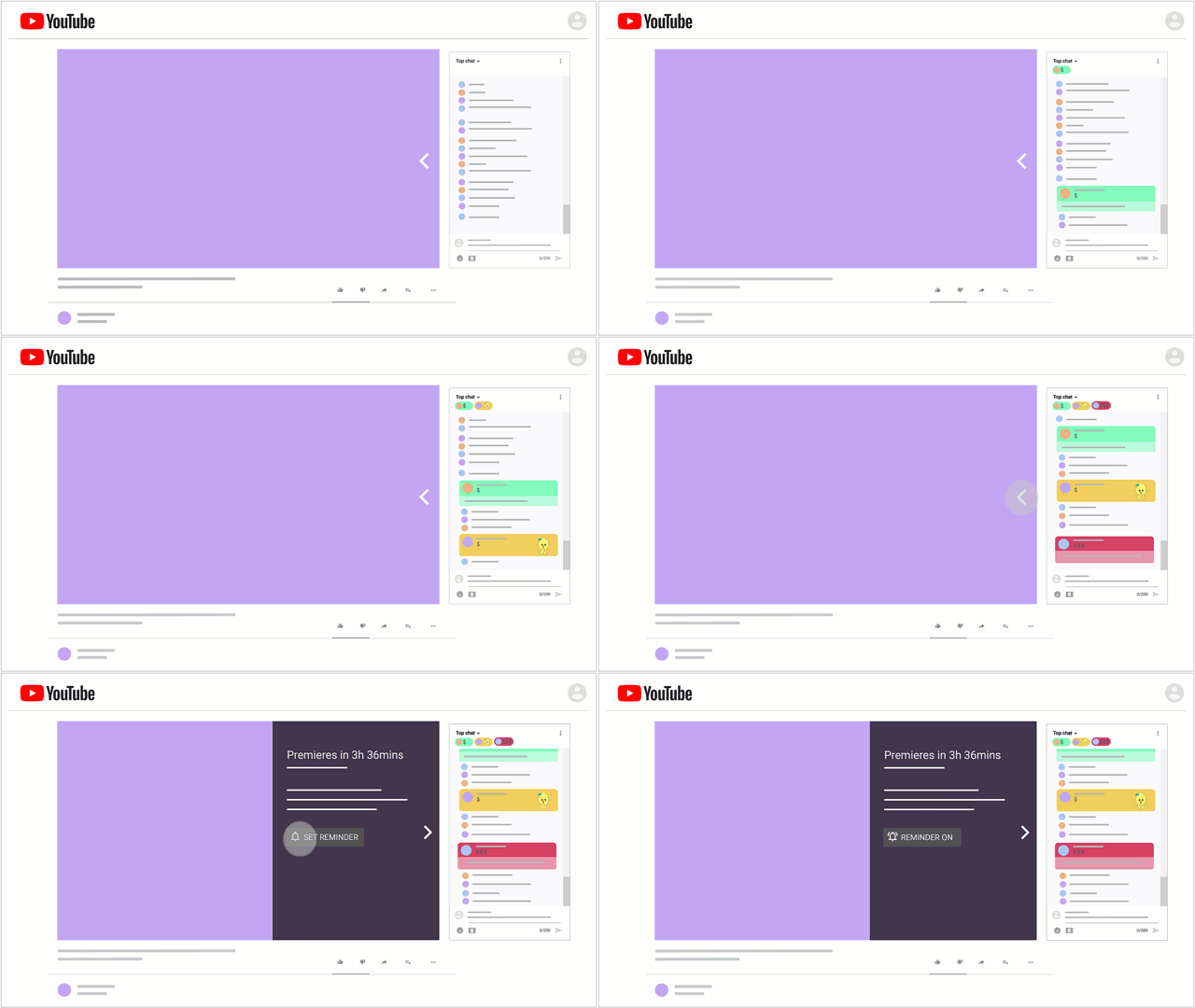
A YouTube Premiere lets artists and their fans watch and experience a new video together in real-time. When you set a premiere, you create a public watch page for your video. Share this with fans ahead of time so they set reminders, chat, and leave comments before the video goes live. This helps build excitement by allowing viewers to set reminders, chat, and leave comments before the video goes live. Premieres appear across YouTube just like regular uploads, offering all the benefits of early engagement and increased shareability.
Why Premieres Matter for Independent Artists
For independent artists without a label's marketing budget, YouTube Premieres level the playing field. Unlike a standard upload that quietly drops into the feed, a Premiere creates a live event around your release — and YouTube's algorithm treats it differently as a result.
When fans engage in the live chat, set reminders, and interact with your watch page before the video goes live, those signals tell YouTube that your content is worth promoting. The more pre-Premiere activity you generate, the more likely YouTube is to surface your video in recommendations and search results after it drops.
For Australian independent artists in particular, Premieres are a powerful way to build a global audience without a physical tour. A fan in the UK or the US can watch your new clip go live at the same time as someone in Brisbane — and that shared moment is what turns casual listeners into long-term supporters.
How to Create and Customise Your Premiere
Creating and customising your YouTube Premiere is straightforward:
- Upload Your Video: Start by uploading your video via YouTube Studio.
- Choose Premiere Type: Decide whether to create an instant premiere or schedule one for a later date. We recommend scheduling for a later date to maximise engagement.
- Schedule Your Premiere:
- In the visibility tab, select "schedule."
- Set the desired date and time.
- Check "set as premiere."
- Share Your Watch Page: Once scheduled, you'll receive a public watch page link to share with your network.
- Customise Your Premiere:
- Click on the "Set Up Premiere" prompt.
- Select a Countdown Theme.
- Set up a live redirect.
- Add a trailer (if eligible).
- Save and Schedule: Once customised, click "Save and Schedule.
Best Practices for a Successful Premiere
To make the most of your YouTube Premiere, follow these best practices:
- Timing: Check your analytics to see when your audience is most active. Generally, releasing your video at 10 AM on a weekday or at 5/6 PM on a Friday can maximise viewership.
- Advance Scheduling: Schedule your premiere at least 48 hours in advance and share the watch page link across your social media platforms.
- Custom Thumbnails: Create and upload a custom thumbnail to attract more viewers.
- Engage During the Premiere: Respond to live chats and let your viewers know you’re watching with them. This enhances the shared experience and builds stronger connections with your audience.
- Countdown Timer: The countdown will start at the scheduled time, building anticipation for your video.
- Live Redirect: Use this feature to send your audience to another premiere or live stream after your premiere ends. Redirecting to your own live stream can further engage your fans and keep the momentum going.
- Trailers: If you have at least 1,000 subscribers, you can upload a trailer to play before your premiere. This provides another opportunity to share pre-save content and build excitement.
- Monetisation: If you’re in the YouTube Partner Program, you can access additional features to monetise your channel. Check out our blog post here on how to monetize your channel.
What to Do in the 48 Hours Before Your Premiere
The 48 hours leading up to your Premiere are just as important as the Premiere itself. Here's how to maximise the build-up:
- Post the watch page link across all your socials — Instagram Stories, TikTok, Facebook, and X. Pin it to the top of your profiles.
- Create a countdown — use Instagram's countdown sticker in Stories so fans can set a reminder directly from their phone.
- Send it to your mailing list — if you have an email list, a simple "my new video drops at [time] — watch it with me live" message is enough.
- Engage with anyone who comments on the watch page — Google and YouTube reward early engagement, so reply to every comment you get in the lead-up.
- Ask other artists or collaborators to share it — even one or two shares from artists with engaged followings can significantly lift your view count in the first hour.
The first 24 hours after your Premiere goes live are critical for YouTube's algorithm. A strong start in that window — driven by the audience you've built during the Premiere — will determine how widely YouTube promotes your video going forward.
Conclusion
After the Premiere — Keeping the Momentum Going
Once your Premiere ends, the work isn't over. Here's how to capitalise on the momentum:
- Share the replay immediately — post the full video link across your socials within the first hour. Fans who missed the live event are still warm leads.
- Pin a comment on the video — thank your fans for watching and include a call to action like saving the track on Spotify or following you on socials.
- Respond to every comment in the first 24 hours — YouTube's algorithm measures engagement velocity, and comment replies count as interactions.
- Create a short clip for TikTok or Reels — take a highlight from the video or the live chat reactions and turn it into a short-form post that drives people back to the full YouTube video.
- Check your YouTube Studio analytics 48 hours later — look at your click-through rate on the thumbnail and your average view duration. If either is low, adjust your thumbnail or the video's opening hook for your next release.
YouTube Premieres are one of the most underused tools available to independent artists. Done well, they turn a single release into a genuine event — and that energy translates directly into streams, followers, and algorithm momentum that keeps working long after the Premiere ends.
Ready to distribute your music and grow your presence globally? Sign up to GYRO and get your music on YouTube Music, Spotify, Apple Music and 100+ platforms today.


!%20(3).png)
!%20(2).png)
!%20(3).png)
!%20(1).png)
!%20(2).png)